AI Cost
OpenAI background mode: 2h and 8h windows cut costs up to 40%
The Responses API now offers 2h and 8h completion windows at 30% and 40% off. When to use them, what you save, how to turn them on and what breaks.
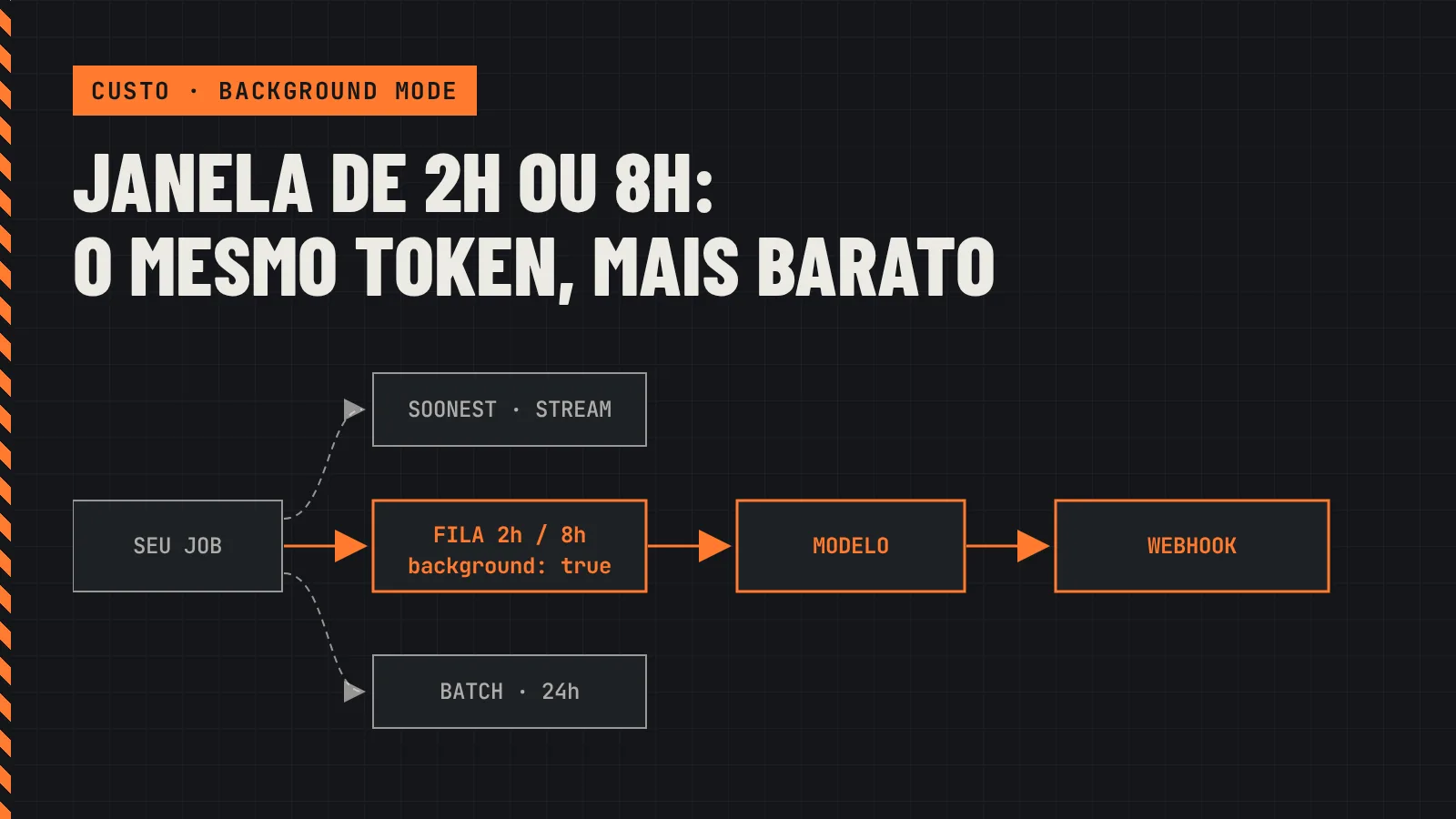
Since November 17, 2026, OpenAI's Responses API charges less per token when you agree to wait. In background mode, a call with a 2-hour completion window costs 30% less than Standard, and one with an 8-hour window costs 40% less, according to the changelog and the background mode guide. The feature is in public beta on GPT-6.2 Astra, GPT-6.2 Sol, GPT-6.1 Terra and GPT-6 Luna.
If you run nightly reports, ticket classification, meeting summaries or CRM enrichment, this is a discount without rewriting your workflow. Below: when to use each window, what you save, how to turn it on, and what changes for caching, rate limits and data.
What changed
Background mode is not new: you send background: true, get an ID back and fetch the result later instead of holding a connection open. What is new is the background_options.completion_window parameter, with three values:
| Window | Discount vs Standard | Streaming | Rate limit |
|---|---|---|---|
soonest (default) |
none | yes | the model's normal limits |
2h |
30% | no | shared with the Batch API |
8h |
40% | no | shared with the Batch API |
Source: background mode guide, read on 2026-11-24.
The same day, OpenAI said new models will not get Flex processing. The Flex guide confirms it: Flex is unavailable on GPT-6.2 Astra and Sol, won't be added to future models, and the beta is winding down. In practice, the 2h and 8h windows replace Flex if you want to pay less for slow answers.
What a token costs now
The pricing page does not list separate 2h and 8h prices. It states that the windows are 30% and 40% below Standard. The 2h and 8h values below apply that discount to the short-context Standard price (up to 272K tokens).
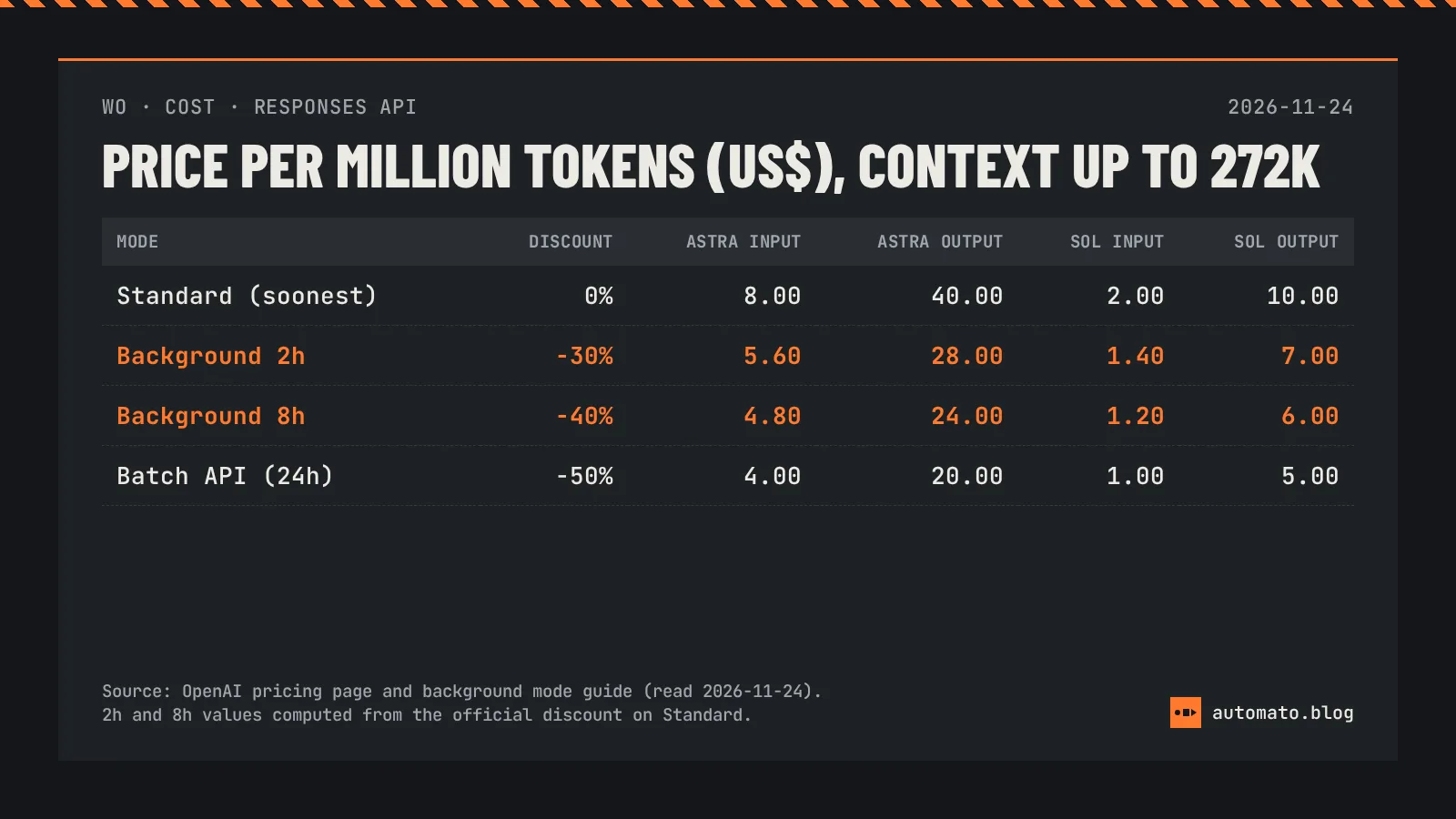
The Batch API is still cheaper: 50% off, per the Batch API guide. The difference is format and deadline, not just price.
What you save per month
Hypothetical example. The assumptions are ours, not OpenAI's: 10,000 calls a month, each with 3,000 input tokens and 800 output tokens. That is 30 million input tokens and 8 million output tokens a month, no caching.
Formula: (million input tokens × input price) + (million output tokens × output price).
| Mode | GPT-6.2 Sol (US$/month) | GPT-6.2 Astra (US$/month) | Saving vs Standard |
|---|---|---|---|
| Standard | 140 | 560 | — |
| Background 2h | 98 | 392 | 30% |
| Background 8h | 84 | 336 | 40% |
| Batch API (24h) | 70 | 280 | 50% |
Sol on Standard: 30 × 2.00 + 8 × 10.00 = US$140. On the 8h window: 30 × 1.20 + 8 × 6.00 = US$84. Redo it with your own volume and average prompt size. The percentage stays the same; the dollar amount does not.
Which window to pick
Decide by when someone needs the result, not by the discount.
- soonest: someone is waiting on screen. Support, chat, autocomplete. No discount, streaming available.
- 2h: the result is needed within the same shift. Morning inbox triage, a summary of today's meetings, ticket classification a person reviews in the afternoon.
- 8h: the result must be ready by tomorrow morning. Nightly reports, CRM enrichment, review of contracts piled up during the day.
- Batch API: large volume with a 24-hour deadline. Up to 50,000 requests per batch, in a JSONL file of up to 200 MB, one model per file, per the Batch API guide.
The 8h window gives up 10 points of discount against Batch, but you don't have to build a file, upload it through the Files API and map custom_id values back. If your workflow already makes one call per item, such as an HTTP node in n8n or a scheduled function, switching to 8h means changing three fields.
How to turn it on
Per the guide, the request needs four things: background: true, service_tier set to default, background_options.completion_window set to 2h or 8h, and streaming off.
curl https://api.openai.com/v1/responses \
  -H "Content-Type: application/json" \
  -H "Authorization: Bearer YOUR_KEY_HERE" \
  -d '{
    "model": "gpt-6.2-sol",
    "input": "Group the tickets below by category: ...",
    "background": true,
    "service_tier": "default",
    "background_options": { "completion_window": "8h" }
  }'
Store the returned ID. Then subscribe to the response.completed webhook or poll GET /v1/responses/{id} until the status leaves queued or in_progress. To give up, call POST /v1/responses/{id}/cancel; cancelling twice is safe.
If you leave
service_tieronauto, the call only gets the discount when the API happens to pick Standard. Setdefaultexplicitly and check the tier in the response and on the invoice.
What breaks
Prompt caching does not cross windows. The guide says Standard requests outside the discounted windows can't reuse cache entries created by 2h or 8h calls, even with an identical prompt. If your workflow mixes interactive and overnight calls with the same long system prompt, measure first: what you save on the window can be lost on the cache.
The rate limit is shared with Batch. 2h and 8h calls use the same Batch/Background rate limit as Batch API jobs, and input tokens count at submission. A large batch can delay your 8h jobs. Split them by project if you need to.
The guide does not say what happens when a window runs out. The text we read gives no status or billing rule for a call that misses its deadline. Set your own deadline, cancel what passes it, and have a retry path.
Data is stored temporarily. Background mode stores response data for a while even with store: false or Zero Data Retention, encrypted at rest, according to the guide. If you process personal data, record this in your vendor assessment and check OpenAI's data controls page before turning the window on.
It is a beta. Prices, models and rules can change. The numbers in this post come from the pricing page as read on 2026-11-24.
What Google shipped
Google released something similar the same week. On November 16, the deferred tier of Gemini Enterprise Agent Platform became generally available, per the release notes.
| Item | OpenAI, 8h window | Google, deferred tier |
|---|---|---|
| Discount | 40% vs Standard | 50% vs Standard PayGo |
| Target | 8 hours | 24 hours |
| How to enable | completion_window: "8h" |
service_tier="deferred", with background and store on |
| State retention | not stated in the guide | 7 days |
| Status | public beta | generally available |
The deferred tier only runs on the global endpoint, does not support CMEK or data residency, and shares the Flex PayGo request quota. If you need to keep data in a region, that matters more than the extra 10 points of discount.
When not to use it
- When a customer is waiting for the answer. With no streaming and up to hours in a queue, the experience breaks.
- When volume is small. At US$20 a month, 40% is US$8; the time to change and test the workflow costs more.
- When the prompt relies on a cache shared with interactive calls.
- When the job triggers an irreversible action, such as sending an email or issuing a charge. A late result arrives out of context; keep a human approval step before the action.
Start with the most expensive nightly job you already run. Switch it to 8h, compare a week of billing with the week before, and only then move the rest.
FAQ
How much do the 2h and 8h completion windows cost on the OpenAI API?
Token rates are 30% below Standard for the 2-hour window and 40% below for the 8-hour window. For GPT-6.2 Sol, input drops from US$2.00 to US$1.40 or US$1.20 per million tokens, per the pricing page read on 2026-11-24.
What is the difference between an 8h background window and the Batch API?
The Batch API gives 50% off but needs a JSONL file and works with a 24-hour window. The 8h window gives 40% off on ordinary Responses API calls, one at a time, with results delivered by webhook or polling.
Can I stream responses with the 2h or 8h window?
No. The guide says to leave stream unset or false for those windows. Streaming only works with the default soonest window, which has no discount.
Is Flex processing still worth using?
Only on models that already support it. OpenAI says Flex is unavailable on GPT-6.2 Astra and Sol, will not be added to future models, and is being wound down.
Sources
- OpenAI — Background mode, Responses API guide (read 2026-11-24)
- OpenAI — API Pricing (read 2026-11-24)
- OpenAI — API Changelog, entries of Nov 17, 2026
- OpenAI — Batch API guide (read 2026-11-24)
- OpenAI — Flex processing guide (read 2026-11-24)
- Google Cloud — Deferred tier, Gemini Enterprise Agent Platform (updated 2026-11-24)
- Google Cloud — Gemini Enterprise Agent Platform release notes, Nov 16, 2026